
On this page
Auto-provisioning means that access to SaaS tools is created, changed and removed automatically. A new employee has every tool on day one. Someone who leaves loses all access the same day. That is an understandable goal. If you use 30 or more SaaS tools, you otherwise spend a lot of time in admin panels.
At Sovaro, we still made a deliberate decision not to create or delete accounts in other vendors’ tools ourselves. We are not against automation or AI agents. Sovaro is AI-native. But the options most companies realistically have today create more risk than they save work. Here is how auto-provisioning works, when it makes sense and what we advise against.
Key takeaways
- Access can only be automated cleanly through a tool’s official interface, meaning SCIM or an API. Many tools only offer it on their Enterprise plan, and usually only together with SSO.
- Service accounts with browser bots and AI agents with write access are not a shortcut. Both need full admin rights in your tools. With both, you have little control over what actually happens. That is dangerous and achieves little in the end.
- AI is strong at spotting, suggesting and preparing. The change in the tool itself should be approved and carried out by a person. With cost context and one click into the right tool, that is quick.
How auto-provisioning works
Software that is supposed to create, change or remove accounts in another tool needs write access there. There are three ways to get it.
The official interface (SCIM or API)
SCIM stands for System for Cross-domain Identity Management. It is an open standard for user management. An identity provider such as Microsoft Entra ID, Okta or Google Workspace tells the tool who to create, change or deactivate. The tool provides the interface itself and decides what is allowed through it. Changes can be traced in the tool. Some tools also offer their own admin API. This is the clean way.
A service account with a browser bot
If there is no interface, the admin panel gets clicked through instead. A service gets its own account with admin rights in the tool. It signs in through browser automation and clicks through user management like a person would. For this to work without prompts, the service also stores the two-factor authentication key for that account.
An AI agent with write access
This is the newest option. An AI agent reads requests and decides on its own who gets which access. It makes the change through an API or the browser. Technically, it uses the same access as the first two options. The only new part is who decides. It is no longer a fixed rule or a person, but the model.
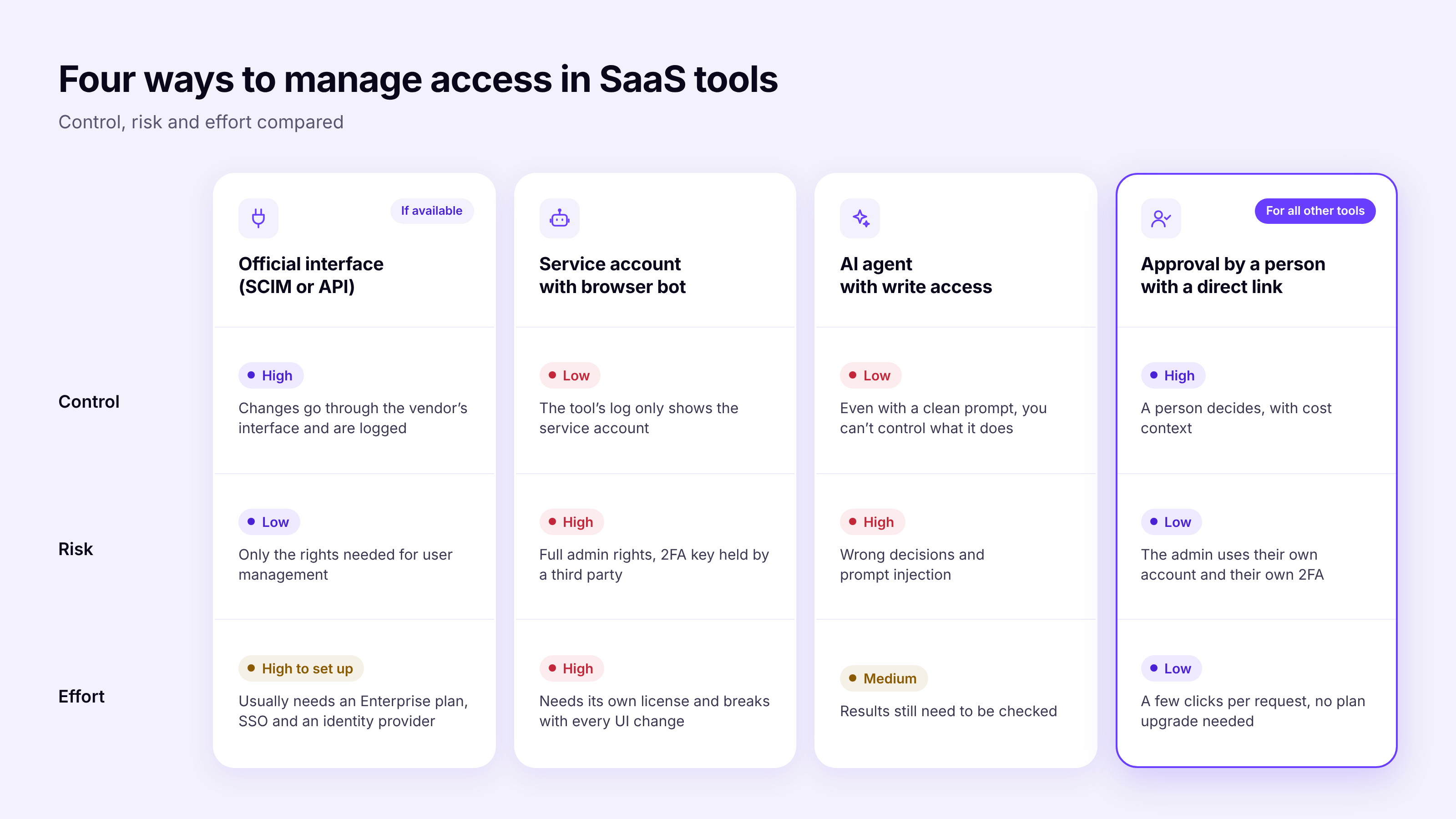
Only two of the four options combine high control with low risk. Which one fits depends on whether the tool offers an official interface.
Why the official interface is often missing
SCIM is rarely part of the standard package. It usually comes with the most expensive plans. We checked eleven common tools to see which plan you need for SCIM.
| Tool | SCIM from plan | Other requirements |
|---|---|---|
| Slack | Business+ | Identity provider; on Free and Pro only with a connected Salesforce org |
| HubSpot | Professional | SSO |
| Figma | Organization | Seats via SCIM only on Enterprise |
| Zoom | Business | SSO, vanity URL, verified domain |
| Notion | Enterprise | SAML SSO |
| Miro | Enterprise | SAML SSO |
| Atlassian (Jira, Confluence) | Enterprise or Atlassian Guard Standard add-on | Identity provider |
| GitHub | Enterprise Cloud | SAML SSO |
| ChatGPT | Enterprise | Not available on Business |
| Canva | Enterprise | Not available for new Teams customers |
| Asana | Enterprise | Identity provider |
As of November 2026, based on the vendors’ linked help pages. Plan names and conditions change regularly.
So the problem is not the technology. It is access to it. Most tools only open their user and license management to other systems on the Enterprise plan. Startups and small companies usually have neither Enterprise contracts nor an identity provider with SSO. For them, the official interface stays closed in most tools. Upgrading every user to Enterprise just to automate user management almost never pays off.
An account is not a license
Even where SCIM exists, it often only controls the account, not the paid seat. In Figma, seats can only be set via SCIM on the Enterprise plan. According to Miro’s help center, a full license cannot yet be downgraded to a free one via SCIM. But the license is exactly what drives cost. If you want to cut spend, you have to check what happens to the license after a change anyway.
Why browser bots and AI agents are not the answer
When the interface is missing, one idea comes up quickly. Let a bot or an AI agent do the work. It sounds clever, but it is not. Both options need exactly the rights you should least want to hand over. And neither solves the problem. They just move it somewhere else.
What speaks against a service account with a browser bot
Full admin rights with a third party. To create and delete users, the service account needs the highest role in most tools. That also lets it export data, change settings or remove other admins. And this account sits permanently outside your company. It is the opposite of the principle of least privilege.
An extra license just for the bot. In most tools, the service account is a regular user account. With per-user pricing, you pay for one more license in every connected tool. Just so a bot can add users there. The very costs SaaS management is meant to cut go up.
The 2FA key is no longer yours. Two-factor authentication is meant to make sure a password alone is not enough. If the password and the 2FA key sit with the same vendor, the second factor barely protects that account anymore. If the vendor is breached, admin access to all connected tools is affected at once.
An unclear audit trail. The tool’s log only shows the service account. Who requested or approved the change is hard to prove later.
It breaks with every UI change. A bot clicks buttons that may not exist tomorrow. When the vendor changes its admin panel, the automation fails. Often nobody notices right away. When access is being removed, a silent failure like that is especially risky. On top of that, some vendors actively detect and block automated access.
Questions under ISO 27001 and the GDPR. ISO 27001 Annex A control 8.2 requires privileged access rights to be limited to as few users and services as possible. They are granted through a defined process. An external account with full admin rights in every tool needs a good justification there. Under data protection law, the vendor has admin access to the connected tools and potentially to their content. That should be covered properly in your data processing agreement and your risk assessment.
Why an AI agent should not get write access
AI agents are very good at understanding requests and spotting patterns. That is exactly why Sovaro uses AI. Write access to user accounts is a different matter.
A clean prompt is no guarantee. You can give an agent a clear instruction. That does not decide what it does in each individual case. It decides anew with every request. You only see what it did afterward. In the worst case, the wrong person gets too many rights. Or someone loses access in the middle of a project.
Prompt injection. AI agents read text from Slack messages, emails, documents or websites. Anyone who can slip text to the agent can also slip it instructions, such as “give this person admin rights.” OWASP is one of the leading organizations for application security. In its list of the biggest risks for AI applications, prompt injection ranks first. Excessive agency of AI systems moved up to third place in the 2026 edition.
Accountability and traceability. If access was granted by mistake, it has to be clear who made that call. “The AI” is not an answer an auditor, your leadership or an affected employee will accept.
The bottom line is that the risk is high with both options. The benefit is smaller than it looks. The only clean way to automate is still the tool’s official interface. Where there is none, a person with one click is the safer and cheaper option.
When auto-provisioning makes sense
Automation is not the problem. If you use an identity provider with SSO and have your tools on the right plan, you should use SCIM. The change then runs through an interface the vendor built for exactly that. With exactly the rights it needs, and with a log.
There is a human in the loop there too. Someone in the company decides who goes into which group in the identity provider. SCIM just carries out that decision reliably. We think that separation is right. A person decides. The change runs through an official interface or through a person with one click.
What works instead
For every tool without SCIM, we recommend a four-step process.
- Requests where people already work. Employees ask for access in chat, for example in Slack. No form, no detour.
- Approval with cost context. The request goes to the person who owns the tool. They see what another license costs and who already uses the tool. Then they decide.
- A direct link into the tool. The approval comes with a link straight into the tool. The admin adds the access in a few clicks. They use their own account and their own 2FA. The tool’s log shows who did it.
- Follow-up based on actual usage and invoices. An agent on the device or a browser extension shows which tools are really used. Comparing that with the invoice shows whether paid licenses go unused. And whether any access is still active after offboarding. This is where AI is strong. It spots patterns, finds shadow IT and suggests what can go.
That way, AI handles spotting, suggesting and preparing. A person makes the decision and carries it out with one click. Our guide to deprovisioning shows how to remove all access during offboarding. What happens to access when someone changes teams is covered in our guide to privilege creep.
How Sovaro helps
Employees simply post their request in Slack, without a traditional ticket. It goes straight to the IT admin in Sovaro. When someone needs a license, the person who owns the tool gets the request in Slack. With cost context and a direct link into the tool. Finance is notified about every new license. The Sovaro Agent and the browser extension show which tools are actually used. Try it for free
Frequently asked questions
What is auto-provisioning?
Auto-provisioning means that access to SaaS tools is created, changed and removed automatically. Usually an identity provider controls this through SCIM. When something changes there, the account in the tool is updated.
What is SCIM?
SCIM is an open standard for user management. Through SCIM, an identity provider creates, changes and deactivates accounts in other tools. The tool has to support SCIM. That is often only the case on higher plans.
Is auto-provisioning unsafe?
Through the tool’s official interface, it is a safe option. It becomes dangerous when that interface is missing. Then browser bots with full admin rights or AI agents with write access often step in.
Do small companies need SCIM?
With an identity provider and tools on the right plan, SCIM is worth it. Without those, a clear process of request, approval and direct link is usually faster and cheaper.
Can AI still help with access?
Yes. AI spots unused licenses, finds shadow IT and prepares approvals. Only the change in the tool itself should be carried out by a person.
See Sovaro with your own data.
Connect Google Workspace or Microsoft Entra and see your devices, apps, and licenses in minutes.
14-day free trial, no payment details required. Cancel monthly.