
On this page
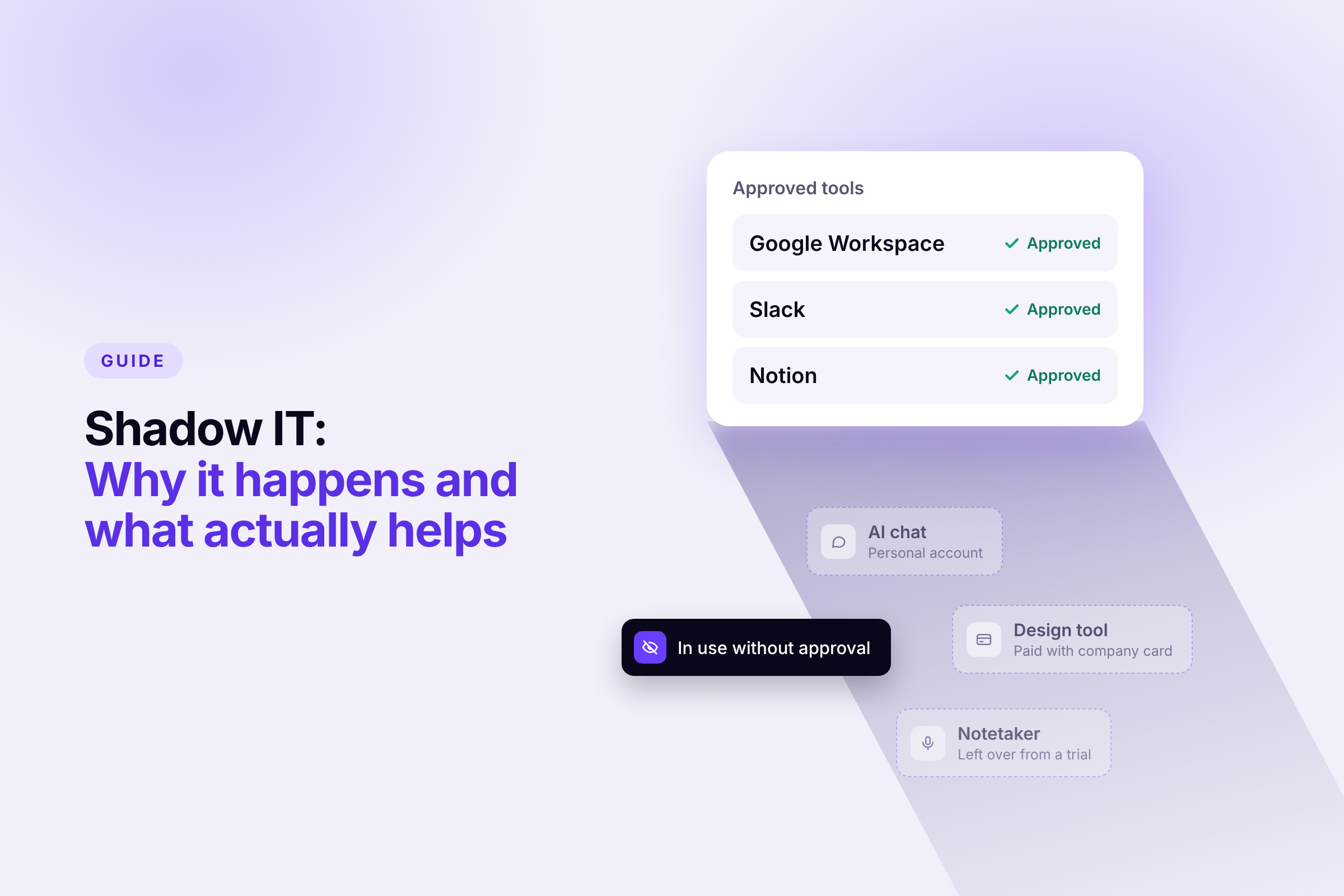
Almost every growing company has two IT landscapes. One is official: tools that someone selected, paid for and set up. The other grows on the side, from free trials, subscriptions on the company card and AI tools employees picked up themselves because they get more done with them.
That second landscape is called shadow IT. It's not a fringe issue, and it's rarely a sign of poor discipline. It becomes a problem because nobody has the full picture: what data sits where, who has access to what, and what it all costs.
This guide explains how shadow IT happens, why AI makes it a bigger issue, and how to get it under control without slowing your team down.
Key takeaways
- Shadow IT covers software, accounts and devices used for work without being officially known or approved. AI makes it a bigger problem: in Germany, almost three in ten people who use AI for work rely on tools their employer didn't provide, and in smaller companies it's one in three.
- The cause is rarely carelessness. It's a gap between what teams need to do their work and what is officially available.
- Bans don't help much. What works is automatic visibility, a deliberate decision on every tool, a good official AI option and a few clear rules.
What counts as shadow IT
Shadow IT is any software, account or device used for business purposes without being officially known, reviewed or approved. That doesn't have to mean anyone broke a rule. In many companies, there simply are no rules to break.
In cloud-first teams without a server room, shadow IT has little to do with technology in the classic sense. Typical examples:
- Subscriptions on the company card: a design tool in marketing, a notetaker in sales, each a few euros a month and without any central overview.
- Personal accounts used for work: a tool is used with a personal email address because signing up that way was faster.
- Free trials that become permanent: what started as a quick test holds customer data years later, even though nobody ever reviewed the tool.
- Apps connected without approval: employees give third-party apps access to the mailbox, calendar or files of their company account.
- AI tools: currently the fastest-growing form.
Not every unknown tool is a risk. It becomes critical as soon as sensitive data sits in it or processes depend on it without anyone knowing.
Why AI makes the problem bigger
Shadow AI refers to AI applications used for work outside the IT the company officially provides or manages: chatbots, translation services, transcription tools or image generators, often through personal accounts. Using them isn't necessarily prohibited. But AI makes it particularly easy to pass on company information: texts, spreadsheets or entire documents can be uploaded in a few clicks.
Recent studies show how widespread this is:
The gap is obvious: AI has long been part of everyday work for many people, yet only a fraction of companies offer an official option. That gap is exactly where shadow AI grows.
Why employees turn to shadow IT
The easy explanation, that employees simply ignore the rules, almost always falls short. Shadow IT is less a discipline problem than an organizational one. The causes tend to be the same:
- Time pressure: a proposal has to go out today, and an AI tool delivers a first draft in seconds.
- Slow approvals: if it's unclear who decides on new tools, or an answer takes weeks, people find their own solution.
- No alternatives: if you use AI privately and get nothing comparable at work, you bring your own tool.
- Fear of judgment: many people don't talk openly about using AI, for example because they worry it might look lazy. A study by KPMG and the University of Melbourne shows how common this hidden use is: almost half of respondents in Germany admit to presenting AI output as their own work or knowingly working around internal guidelines.
One finding from IW Köln stands out: people who feel supported by their employer in building AI skills are more likely to also use tools their employer didn't provide. The authors see the main reason in a gap: skills are encouraged, official tools are missing. If you encourage your team to use AI, you should also give them a suitable tool.
In that sense, every shadow tool is also a signal. It shows which tools your team actually needs, often long before there's a budget for them.
At what size it becomes critical
In small teams, a lot can still be sorted out quickly. You know who uses which tool, and when someone leaves, somebody still remembers their accounts.
In our more than 100 conversations with people responsible for IT, HR and finance, one pattern keeps coming up: somewhere between 30 and 50 employees, this changes. New teams form, not everyone knows everyone anymore, and each department puts together its own toolbox.
Each of these islands works on its own. But soon nobody can easily answer which tools the company actually uses and what they cost. Shadow IT grows with the company, and the later you deal with it, the more work it becomes.
What shadow IT leads to
The consequences usually show up at inconvenient moments: when an employee leaves, when a customer asks a data protection question, or when you look at the credit card statement.
- Data leaving the company: customer lists, salary data, contracts or source code end up in accounts the company can't access. According to Verizon, source code is the most common type of data sent to external AI models.
- Duplicate and forgotten costs: several teams pay for tools with almost identical features. AI subscriptions run through expense claims or personal cards and don't appear in any overview.
- Access after someone leaves: you can't revoke what you don't know about during offboarding. Personal accounts usually can't be blocked centrally by the company either.
- Data protection gaps: under the GDPR, you need to know which services process personal data and have a data processing agreement with providers that process data on your behalf. For unknown tools, you have neither.
- Requirements of the EU AI Act: since February 2025, the AI Act has required companies that use AI to take care of their employees' AI literacy. Under the amending Regulation (EU) 2026/1744, since 27 July 2026 companies must take measures that promote AI literacy, but don't have to guarantee a specific level of competence. Meaningful measures still require knowing which AI tools are in use at all.
Why bans and inventory lists aren't enough
The obvious reaction is to simply block AI tools. But that doesn't make the problem go away, it just moves: to personal smartphones, to home Wi-Fi, out of sight. At the same time, a ban slows down exactly the employees who are most engaged. IW Köln also explicitly advises against blanket bans.
Just as common is the inventory: a survey of the team or a round through every department, with the results ending up in a spreadsheet. That's better than nothing, but it has two weaknesses. Hardly anyone voluntarily lists tools they think they shouldn't be using. And the list is out of date by the time it's finished, because new tools keep appearing.
The admin console of Google Workspace or Microsoft Entra only shows part of the picture, too: the applications people sign into with their company account. Whatever is used with a personal account or simply paid for with the company card stays largely invisible there. And that's the core of shadow IT.
Five steps to a clearer picture
The goal isn't to eliminate shadow IT completely. The goal is to know what's in use and to decide deliberately what can stay.
1. Create visibility, automatically
You can only manage what you can see. Instead of taking stock once a year, the overview should build itself continuously and without manual effort. Two sources complement each other here: actual usage, meaning which applications are opened on company devices and in the browser, and invoices, meaning which tools show up on the company card and in receipts. Only both together also capture the tools an SSO report misses.
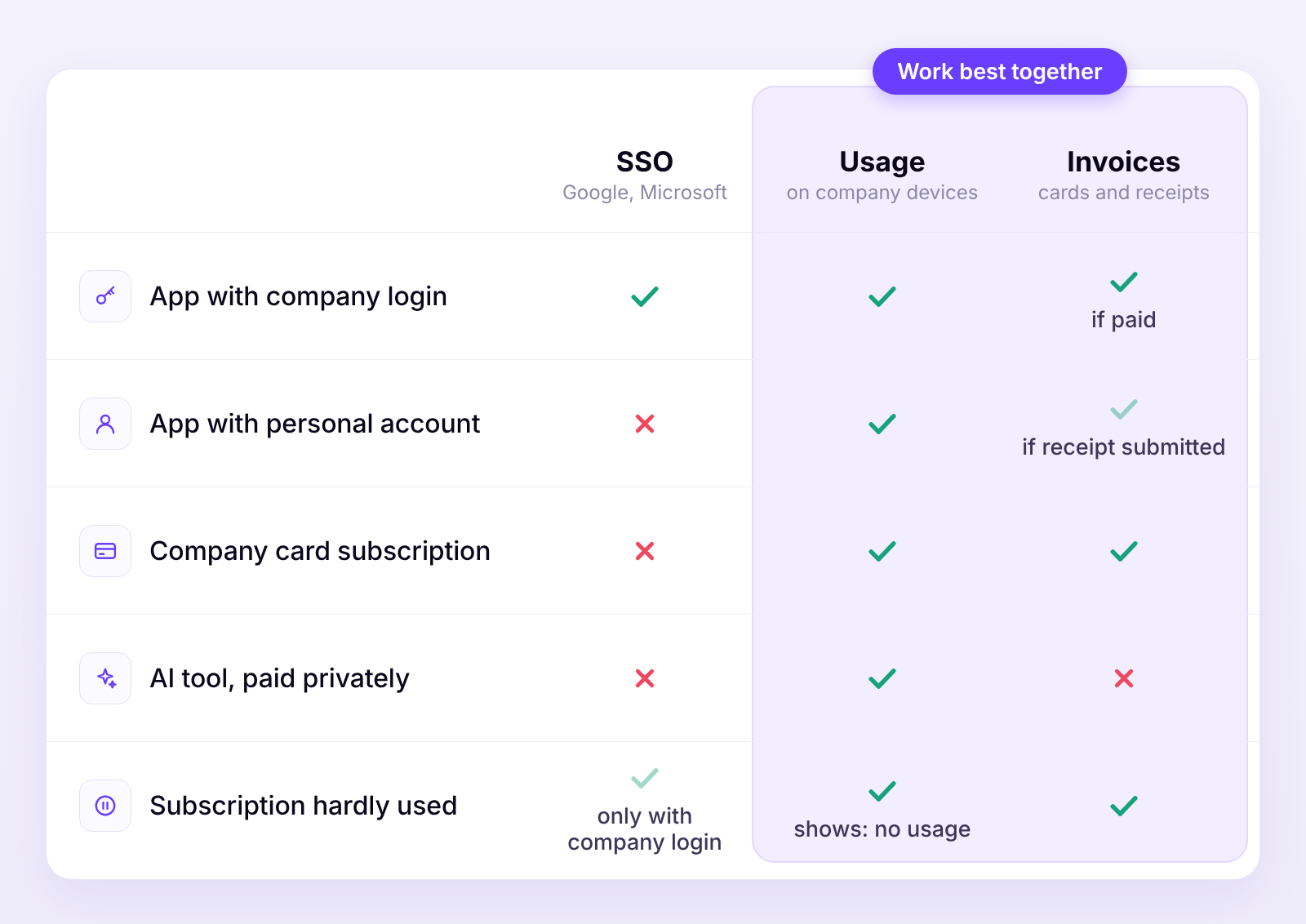
Detection requires that devices are covered and invoices are available. A tool used with a personal account also becomes visible as soon as someone submits the receipt.
How Sovaro does it
Sovaro detects your tools in two ways: through actual usage on company devices and in the browser, and through your invoices, which you simply forward or upload. That way, tools without a company login become visible too, as do subscriptions on the company card and licenses nobody uses anymore. When recording usage, Sovaro doesn't read any content, neither documents nor AI prompts. How this works step by step is shown in Uncover shadow IT with Sovaro. Try it for free
Be transparent about this with your team: what data you collect, why, and who sees it. For a tool overview, it's enough to know which application is used, not what happens inside it. If you have a works council, involve it early, because introducing this kind of software may require its consent in Germany.
2. Decide deliberately on every finding
Not every tool you discover has to go. In principle, there are four options:
- Approve: the tool proves its worth and is officially managed from now on.
- Switch to a company account: the tool stays, the personal login goes.
- Replace: an already approved tool covers the same need. Move the data and cancel the subscription.
- Shut down: the tool is too risky or simply unnecessary.
The real problem is less a single niche tool than one nobody feels responsible for. That's why every approved tool needs two owners: one person who looks after it functionally, and one who is responsible for the costs.
3. Provide an official AI option
Shadow AI mainly grows where there's no official alternative. The business plans of the major providers generally rule out using your inputs to train their models. Even more important: the accounts belong to the company, even when someone leaves. Ask your team what they already use. If half of them already work with a particular tool, that's an important signal of what your team needs.
4. Clear rules on one page
A policy nobody reads protects nobody. As an everyday guide, one page is enough for most companies: which tools are approved for what, which data never goes into an AI tool, who reviews results, who to contact when you need a new tool, and what to do if sensitive data accidentally ended up in a tool. Add two commitments: requests for new tools get an answer within a few days, and nobody has to justify having used AI.
5. Secure offboarding and review regularly
Order doesn't maintain itself. Two fixed routines help. First, every known tool belongs in your offboarding checklist, so access reliably ends when someone leaves. Second, once a month someone reviews only the newly added tools. That's far less work than an annual inventory.
Conclusion
Bans don't eliminate shadow IT. It loses its significance once the official option is better than the workaround and you know what's actually being used in your company. The first step is therefore visibility. Everything after that is a series of manageable, clear decisions.
Try Sovaro for free: 14 days without payment details, and free afterwards for up to 10 employees.
Frequently asked questions about shadow IT
Sources
- IW-Kurzbericht 63/2026: Schatten-KI, German Economic Institute (IW), September 2026
- Beschäftigte nutzen vermehrt Schatten-KI, Bitkom, October 2025
- Two thirds of Germans use AI, but only a few trust it, KPMG and University of Melbourne, May 2025
- 2026 Data Breach Investigations Report, Executive Summary, Verizon
- Regulation (EU) 2026/1744 amending the AI Act, EUR-Lex, July 2026
See Sovaro with your own data.
Connect Google Workspace or Microsoft Entra and see your devices, apps, and licenses in minutes.
Free up to 10 employees. From 11 employees, 14-day free trial without payment details.