
On this page
In Germany, anyone who takes out a subscription as a private customer can get out after the initial term with one month's notice. That rule does not apply to contracts between companies, because Section 310 of the German Civil Code explicitly excludes them. For business software, what counts is what the contract says. Often that means renewal for another year unless you give notice one to three months before the term ends.
With three tools you can keep that in your head. With 40 you cannot. This guide shows how to build a contract overview so that no deadline slips through. You will find a template for it further down.
Key points
- The one-month rule from German consumer law does not apply to business contracts. The contract decides.
- The date that matters is the last day to cancel, meaning end of term minus notice period.
- Notice only counts once it has reached the vendor.
- Plan a review six weeks before the last day to cancel. That leaves time to look at usage and the number of licenses.
Why software deadlines slip through so often
Software is often not bought centrally. Marketing books a tool with the company credit card, sales signs an offer, and the confirmation sits in the inbox of whoever placed the order. Accounting only sees the charge, but neither the term nor the notice period. This is exactly how shadow IT comes about.
On top of that, every vendor counts differently. One asks for 30 days, the next for three months, a third only accepts cancellation through a form in the customer account. If you only check this when the invoice for the new year arrives, you are too late.
The last day to cancel is the date that matters
Many lists only show when a contract ends. For planning, another date is more important, namely the day by which your notice must have reached the vendor. If an annual contract ends on December 31 and the notice period is three months, that day is September 30.
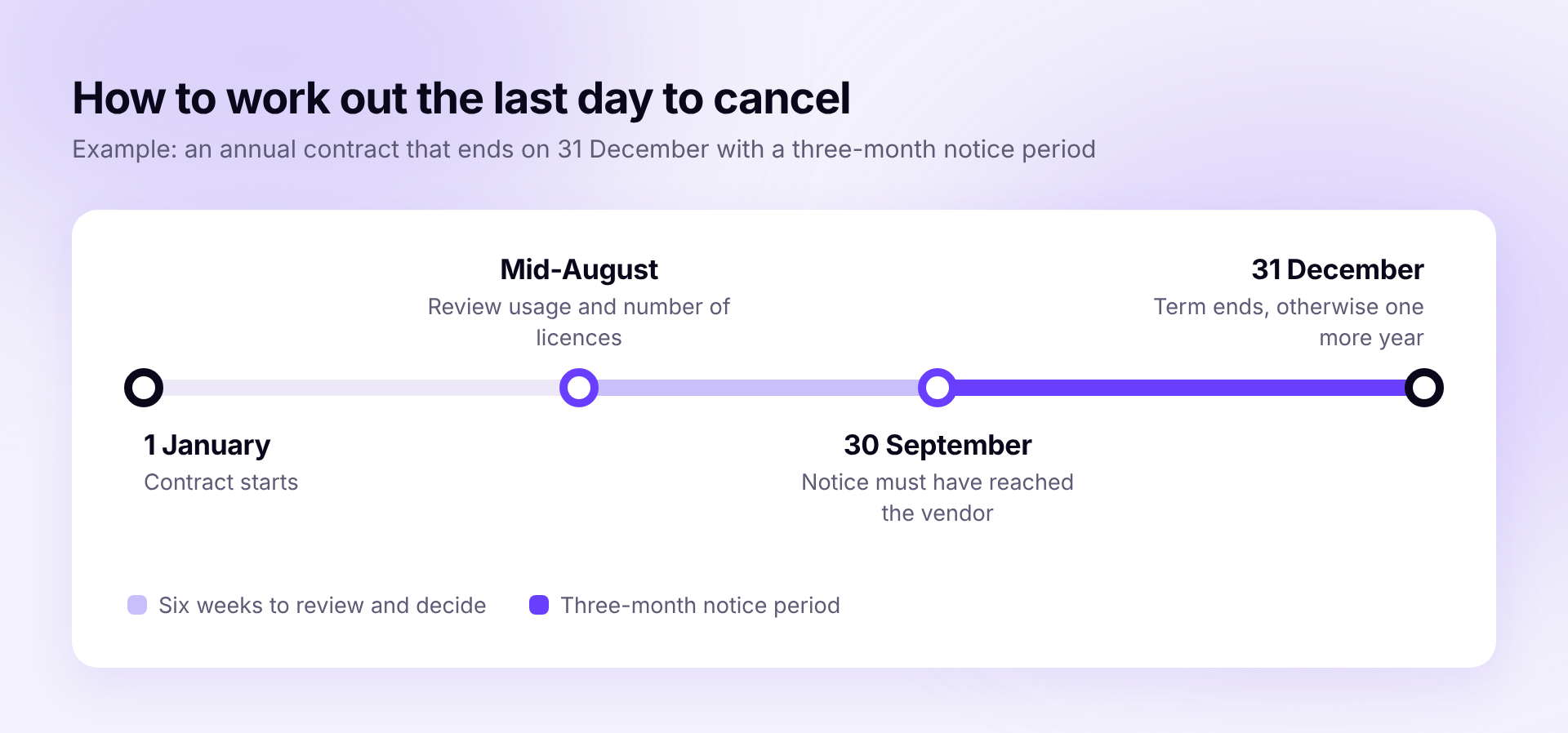
What counts is receipt by the vendor and not the day you send your notice. A few days of buffer do no harm. The decision also needs lead time. Whether a tool stays, whether 30 licenses are enough instead of 50 or whether a cheaper plan fits is not something anyone settles in an afternoon. Six weeks before the last day to cancel is a good time to start.
How to build the contract overview
- Collect the contracts. Go through the charges of the last twelve months in accounting and on the credit card statements. That way you also find subscriptions nobody has on their radar anymore.
- Enter the key data. For each contract you need vendor, cost, end of term, notice period and length of the renewal. If any of that is missing from the invoice, check the order confirmation or the customer account.
- Assign owners. Every contract gets one person who decides on renewal or cancellation. As a rule that is the team using the tool.
- Set dates. Put the review date and the last day to cancel in the owner's calendar.
- Look at usage before every deadline. How many of the paid licenses are assigned, and how many are really used? Our guide Find unused software licenses explains how to find out. Accounts of former employees should be closed when they leave, and our guide to deprovisioning shows how to do that properly.
Template for the contract overview
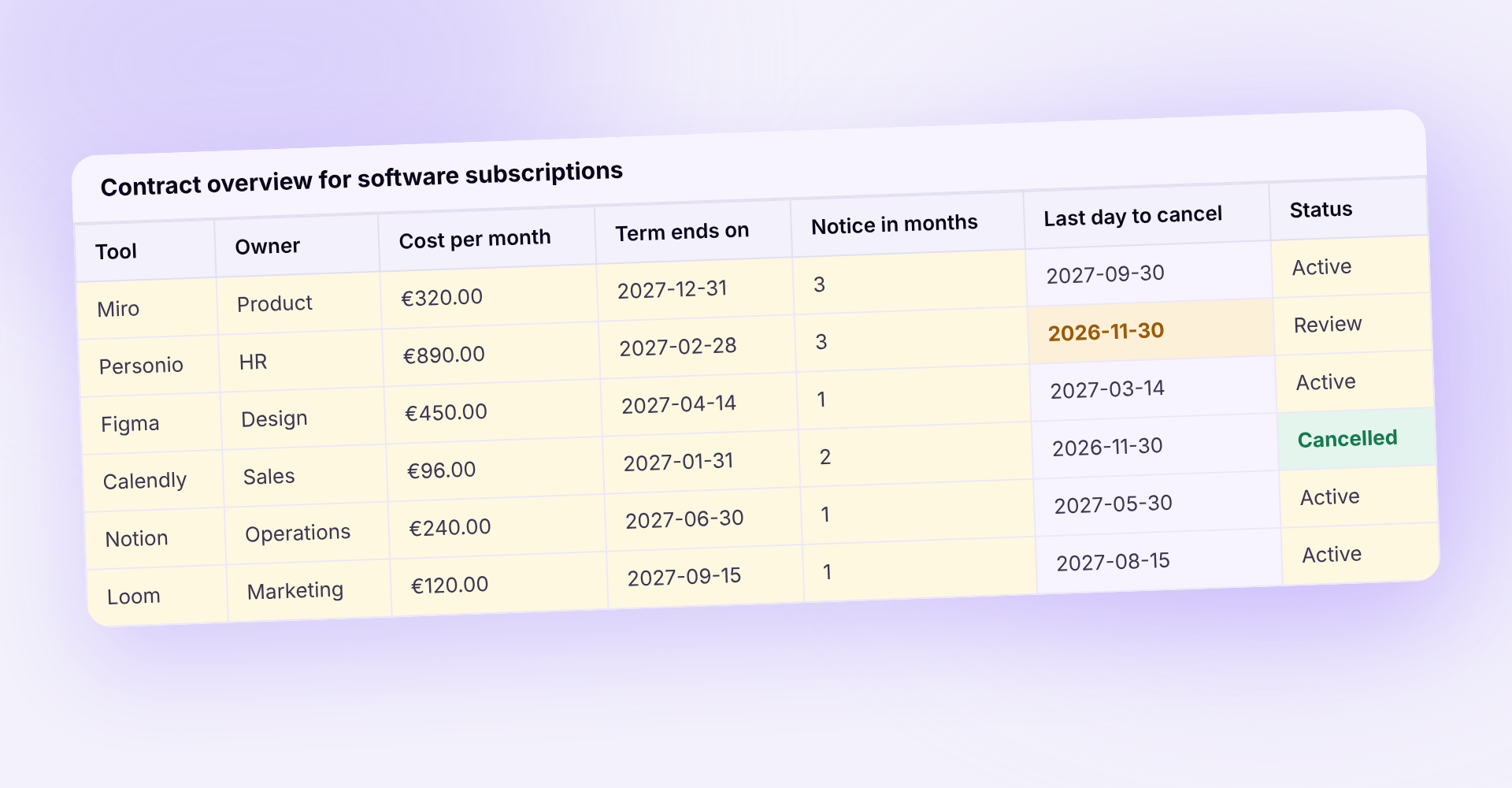
The template works out the last day to cancel and the review date itself as soon as you enter end of term and notice period. Deadlines that fall within the next 90 days are highlighted in color.
How Sovaro handles it
In Sovaro you store contract, renewal and notice period for each subscription. Upcoming renewals appear in a list with date and cost, and next to it you see how many licenses are paid for, assigned and actually used. Sovaro fetches invoices automatically from Gmail or Outlook, or you simply forward them, and assigns them to the right tool.
Frequently asked questions
See Sovaro with your own data.
Connect Google Workspace or Microsoft Entra and see your devices, apps, and licenses in minutes.
14-day free trial, no payment details required. Cancel monthly.