
On this page
New AI tools come out almost every week. Many companies have signed up for several subscriptions in a short time. One tool writes copy, one summarizes meetings, another reads invoices. A few months later, the picture often looks different. Some tools hardly anyone uses anymore. Others do almost the same thing. And nobody knows exactly what it all costs together.
That is rarely the AI's fault. What is usually missing is a simple check before buying whether the tool fits your workflow. This guide gives you six questions to review AI tools before you buy. We also show how to clean up the tools you already have in four steps. That way, you can choose AI tools for your company with a clear plan.
Key takeaways
- 57 percent of companies in Germany with 20 or more employees use AI. None of them says it is getting the full potential out of AI.
- A good AI tool improves a whole workflow, not just a single step.
- Before you buy, check integrations, data protection, control, existing licenses and a short contract term.
- Reviewing your AI tools once a quarter saves money and keeps you in control.
Why do AI tools often deliver less than expected?
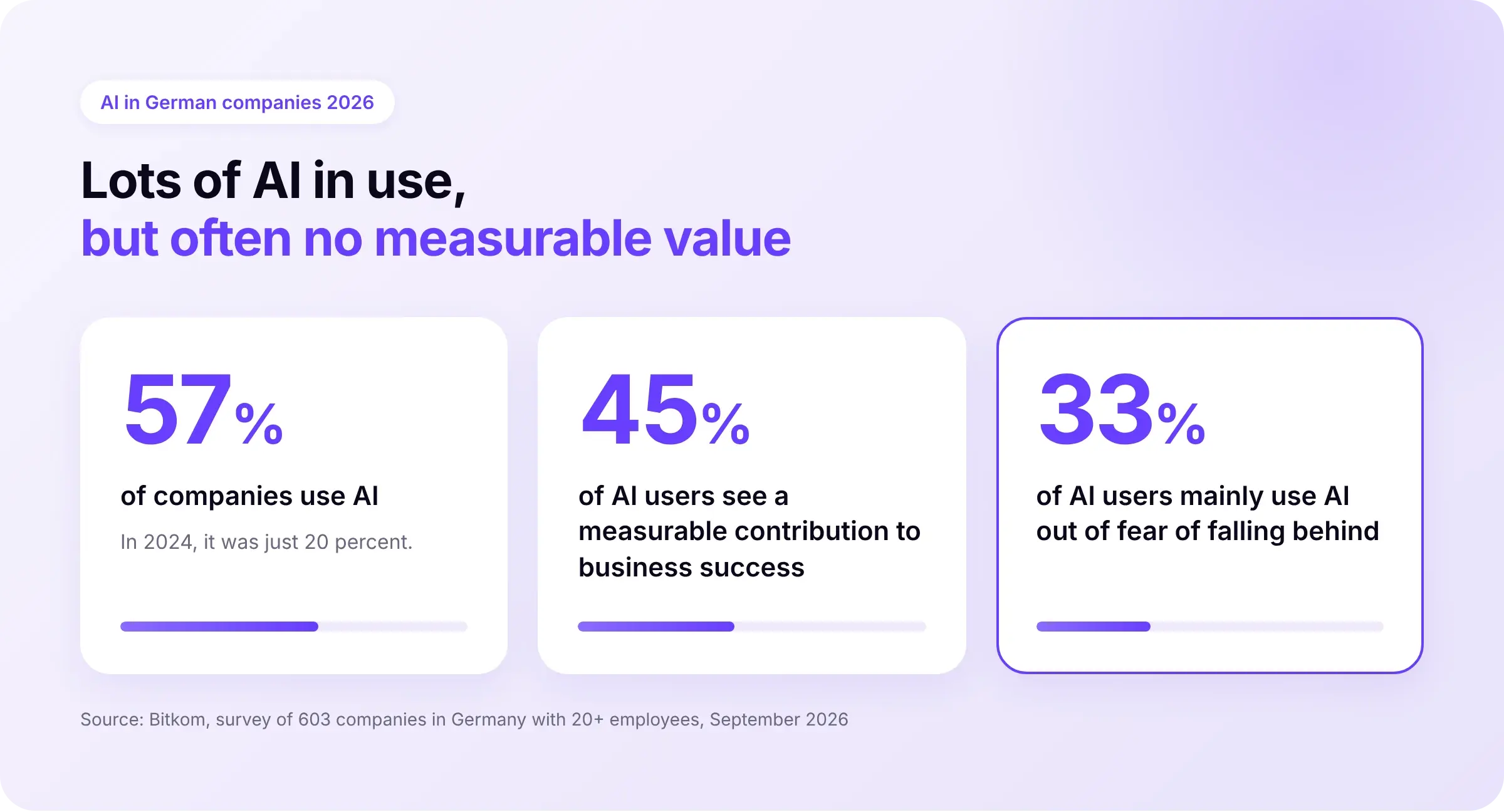
AI has arrived in German companies. In 2026, for the first time, most companies use AI. According to a Bitkom survey from September 2026 of 603 companies with 20 or more employees, the figure is 57 percent. A year earlier it was 36 percent, and two years earlier only 20 percent. 45 percent of companies are spending more on AI this year than last year.
The value has not caught up with that pace yet. Only 45 percent of AI users see a measurable contribution to business success. Not a single one of these companies says it is getting the full potential out of AI. And one in three companies that use AI does so mainly out of fear of falling behind.
If you buy out of worry, you often check less carefully. Tools pile up that nobody planned. On top of that come tools employees use on their own. The German Economic Institute (IW) surveyed employees who use AI at work in spring 2026. Almost three in ten also work with tools their employer does not provide. In companies with fewer than 50 employees, it is one in three. You can read more in our guide to shadow IT and shadow AI.
Where do AI tools fall short in practice?
Most problems with AI tools have little to do with the technology. In SMBs without their own IT department, three patterns are typical.
The tool only solves one step. Many AI tools specialize in a single task. They summarize, translate or extract data. But afterward, someone has to copy the result into the next system by hand. So the actual work remains. That costs money. 41 percent of AI users in the Bitkom survey name integration into existing systems as a major cost.
Nobody is responsible. A team tries out a new tool. The subscription keeps running long after the test is over. A few months later, nobody feels responsible anymore. Then nobody checks whether the tool is still used or when the contract renews.
Several tools do the same thing. Marketing uses one writing tool, sales uses another and leadership uses a third assistant. Each tool makes sense on its own. Together, they cost much more than one shared tool and spread knowledge across many places.
Which 6 questions should you ask before buying an AI tool?
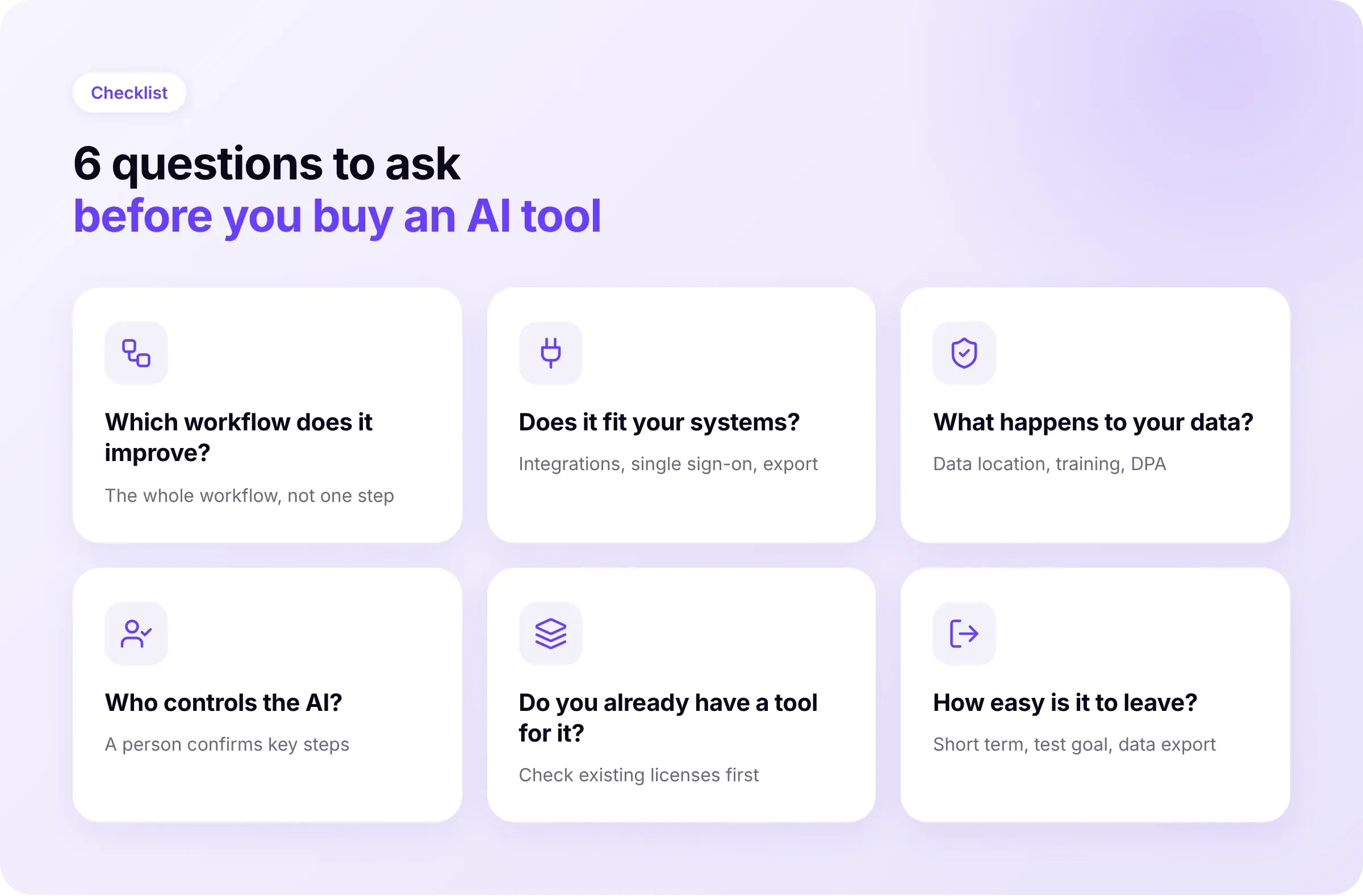
These questions help with any new AI tool, whether for writing, accounting or customer service. If you can't clearly answer several of them, take a second look.
1. Which workflow should the tool improve?
An AI tool pays off most when it improves a whole workflow, not just one step. So describe the workflow once from start to finish. Take an incoming invoice, for example. It gets read, matched with the purchase order, approved, booked and archived. A tool that only reads the invoice saves a few minutes. A tool that covers the whole path takes much more off your plate. So always ask which part of the workflow still happens by hand afterward.
2. Does the tool fit your existing systems?
An AI tool only delivers real value when it connects to your systems. Check whether it works with the software you already use. That includes email, accounting or HR software. Single sign-on and an easy way to export your data matter too. Without them, you quickly end up with another island that nobody maintains.
3. What happens to your data?
Data protection is one of the biggest hurdles for AI. In the Bitkom survey, 66 percent of AI users name it. Before you buy, find out where the data is stored and whether the vendor uses it to train its models. If the tool processes personal data on your behalf, you usually need a data processing agreement (DPA) under Article 28 of the GDPR. Many vendors offer it directly in the admin area. If not, ask for it. If the vendor uses your data for its own training, a DPA alone is not enough. You should be able to turn that option off.
4. Who controls what the AI does?
The more a tool acts on its own, the more this question matters. A tool that only suggests text is usually low risk. A tool that sends emails, creates quotes or changes access on its own needs clear limits. A person should always confirm important steps. Our guide to auto-provisioning explains why this matters especially for access.
5. Do you already have a tool for this?
Many tools you already use now have their own AI features. Before you sign up for a new subscription, it is worth checking your existing licenses. One tool per task is often enough. Our overview of AI license costs shows what the common AI assistants cost.
6. How easy is it to leave?
A flexible contract is worth it, especially with new vendors. At the start, look for monthly cancellation or a short term. Set a clear goal for the trial, for example a specific time saving. And check whether you can take all your data with you if you switch.
How do you clean up the AI tools you already have?
The six questions don't only help before you buy. You can also use them to review tools you already use. Four steps are enough.
Collect all AI tools
List every AI tool used in your company. That includes subscriptions paid with company cards or through expense reports. That is where many small charges hide. Our guide to uncovering shadow IT shows how to find these tools.
Check usage
For each tool, check who used it in the last 30 days. Seats with no logins are the easiest candidates to cancel. Read more in our guide to finding unused licenses.
Pick one standard tool per task
Decide which tool you use for which task and write it down on one page. Cancel duplicate tools at the next possible date. That saves money and makes it easier for new employees to get started.
Assign owners and dates
Every tool needs one person who is responsible for it. They know the notice period and review usage once a quarter. When someone leaves the company, their access to AI tools has to be removed too. Our guide to deprovisioning shows how to do that properly.
How Sovaro helps
Sovaro shows you which software and AI tools are really used in your company. Sovaro AI recognizes more than 500 tools, filters out private apps automatically and recommends which subscriptions you can cancel or replace with cheaper ones. That way, you see costs, usage and owners in one place. Try it for free
Conclusion
A good AI tool fits a real workflow, connects to your systems and has a clear owner. If you ask these six questions before buying and clean up once a quarter, you end up with fewer tools and more value.
Frequently asked questions
How many AI tools does an SMB need?
There is no fixed number. A good rule of thumb is one standard tool per task. In many cases, one general AI assistant and a few specialized tools are enough.
How can I tell if an AI tool is really being used?
Many business plans show in the admin view when someone last signed in. If someone hasn't been active for 30 days, they probably don't need the seat. A quick question to the team also helps.
Do we need a data processing agreement for AI tools?
If the tool processes personal data on your behalf, usually yes. That covers, for example, names in emails, customer data or meeting notes. The legal basis is Article 28 of the GDPR. If in doubt, ask your data protection officer or a data protection advisor.
How often should we review our AI tools?
Once a quarter is enough for most companies. Look at usage over the last 30 days and at upcoming notice periods. That way, you cancel in time, before a contract renews.
What is shadow AI?
Shadow AI means AI tools employees use at work without the company providing them. Often these are private accounts with well-known AI assistants. The problem is less the use itself. It becomes critical when company data ends up outside your contracts.
Sources
- Bitkom: Erstmals nutzt die Mehrheit der Unternehmen KI (German), September 14, 2026, survey of 603 companies with 20 or more employees
- German Economic Institute (IW): Schatten-KI, Beschäftigte sind schneller als ihre Betriebe (German), IW short report no. 63/2026, September 19, 2026
See Sovaro with your own data.
Connect Google Workspace or Microsoft Entra and see your devices, apps, and licenses in minutes.
14-day free trial, no payment details required. Cancel monthly.